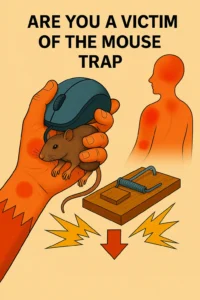
Why Reduce Computer Mouse Strain for Comfort
How to Reduce Computer Mouse Strain Daily
Quick Overview: What You’ll Get From This Post
Neck: The Point Where Mouse Strain Changes Everything
The neck rarely begins the problem.
However, it often becomes the place where people finally feel the strain clearly.
Why?
Because once the shoulder tightens, the neck starts compensating.
A tight shoulder reduces the range of motion in the upper spine.
Therefore, the neck begins doing more stabilising work than it should.
At the same time, screen focus encourages the head to move forward.
Forward head position dramatically increases neck effort.
Even a small forward shift adds constant load.
That load often creates:
Neck stiffness in the afternoon
Tightness at the base of the skull
Reduced turning range
A feeling of carrying the head rather than balancing it
Neck Tightness Signals Computer Mouse Strain
Many people then assume the neck itself is the problem.
However, the neck is often simply responding to the full mouse chain below it.
Fingers, wrist, forearm, upper arm, and shoulder all feed upward.
To Reduce Computer Mouse Strain, the neck must receive relief without force.
Five-Minute Neck Relief
Sit tall.
Slowly turn your head to the left.
Pause.
Return your head to the centre.
Slowly turn your head to the right.
Pause again.
Gently lower your chin toward your chest.
Hold for three calm breaths.
Finally, imagine the crown of the head lifting lightly upward.
No stretching.
Only length.
This often softens neck effort within minutes.
Head: When Mouse Strain Affects Focus and Energy
Once neck tension persists, the head often begins to react, too.
This is where many people notice something deeper.
They feel mentally tired sooner.
Concentration drops earlier in the day.
A mild pressure develops behind the eyes or forehead.
This happens because muscular tension affects breathing and circulation patterns.
A tight neck often reduces natural rib movement.
Reduced rib movement shortens breathing.
Short breathing reduces oxygen efficiency slightly.
The result can feel like:
Afternoon heaviness
Eye fatigue
Reduced focus
Mild headache patterns
Head Fatigue Often Follows Mouse Strain
This is why the mouse becomes more than a hand issue.
It becomes a productivity issue.
The body is spending energy managing tension.
That energy no longer supports thinking clearly.
To Reduce Computer Mouse Strain, the head must stop being held by a tense neck.
Five-Minute Head Relief
Close your eyes briefly.
Take three sideways breaths into the ribs.
Let the jaw soften.
Allow the tongue to relax.
Then gently roll the eyes left and right before reopening them.
This simple reset often reduces head pressure surprisingly fast.
Why the Mouse Becomes a Daily Trap
The mouse appears harmless because it is familiar.
However, familiarity hides repetition.
Repetition hides overload.
Every day, the same grip returns.
The same shoulder reaches.
The same neck leans.
Over weeks and months, this creates a predictable chain.
The mouse is not painful because of one dramatic action.
It becomes painful because a small effort never fully stops.
That is why your original phrase works so well:
The mouse is a trap.
It quietly catches comfort, one small movement at a time.
The trap tightens as each body part compensates for the one before.
Fingers tighten.
Wrist fixes.
Forearm hardens.
Shoulder rises.
Neck braces.
Head tyres.
The entire upper body becomes involved.
To Reduce Computer Mouse Strain, the solution is not to stop working.
The solution is to repeatedly interrupt the trap.
Five-Minute Resets Reduce Computer Mouse Strain
A Five-Minute Full Chain Reset
The best relief often comes from combining all sections into one short sequence.
Try this once every hour if possible.
Minute 1
Open and close the fingers slowly.
Minute 2
Rotate wrists and forearms gently.
Minute 3
Let both arms hang and swing lightly.
Minute 4
Lift and release shoulders.
Minute 5
Slowly turn the head and breathe to the side.
This entire reset takes less than five minutes.
Yet it interrupts the entire strain pattern.
The nervous system responds quickly to changes in movement.
Often, people notice immediate benefits:
Lighter hands
Softer shoulders
Easier neck turning
Clearer focus
That is because tension loses momentum once the chain is interrupted.
How Daily Awareness Prevents Long-Term Mouse Strain
The most powerful change is not equipment alone.
It is awareness.
Notice when the grip becomes too firm.
Notice when the shoulder lifts.
Notice when the jaw tightens while concentrating.
These signals appear early.
If caught early, relief happens easily.
If ignored daily, compensation builds.
That is why Reduce Computer Mouse Strain is less about dramatic correction and more about regular interruption.
Small resets done often beat long recovery later.
The body prefers frequent reminders.
And the upper body responds quickly when those reminders are calm and consistent.
Daily Awareness Prevents Computer Mouse Strain
Reduce Computer Mouse Strain – Anatomy of the Shoulder
The shoulder is a complex structure that allows for an extensive range of motion. It consists of several key components, including the scapula, humeral head, collarbone, and various muscles. The shoulder joint is unique because it is a ball-and-socket joint, allowing for multidirectional movement.
However, this design also makes it susceptible to injuries and instability, significantly impacting a person’s quality of life.
Shoulder: Where Mouse Tension Becomes Structural
Five-Minute Resets Reduce Computer Mouse Strain
A Five-Minute Full Chain Reset