
Are You Falling for the Computer Mouse Trap? Discover the Truth About RSI!
 The Computer Mouse Trap, while Repetitive Strain Injury (RSI) is familiar to many, its widespread implications may not be fully understood. RSI is a prevalent condition that can affect anyone, particularly in our tech-driven world where we spend hours typing, clicking, and scrolling.
In our tech-driven world, where we spend hours typing, clicking, and scrolling, the risk of developing RSI is higher than ever. But what exactly is RSI, and how can we protect ourselves from its debilitating effects?
Right-Click the Image Above. Then, let’s dive into the details and uncover the truth about this common yet often misunderstood condition.
What is Repetitive Strain Injury (RSI)?
RSI refers to pain caused by repeated movements of a body part. It often resolves independently, but specific steps can help speed up recovery. The condition can affect anyone, from office workers to athletes, and is characterized by discomfort in muscles, tendons, and nerves.
The Computer Mouse Trap: Commonly Affected Areas
RSI frequently impacts several areas of the body, including:
- Shoulders
- Elbows
- Forearms
- Wrists
- Hands
- Fingers
These areas are particularly vulnerable due to the repetitive motions we often perform daily. RSI symptoms usually develop gradually and can vary in intensity.
Symptoms of RSI
Common symptoms include:
- Pain can feel like burning, aching, or throbbing in the affected area.
- Stiffness: Joints and muscles may feel tight, making movement more difficult.
- Weakness: Grip strength or general control over movements may decrease.
- Tingling & Numbness: Some people experience pins-and-needles or a loss of sensation in the affected area.
- Muscle Cramps: Uncomfortable spasms or tightening of the muscles may occur.
- Swelling: The affected area might become puffy or inflamed.
It’s important to note that RSI symptoms often develop gradually, potentially going unnoticed initially. This underscores the need for regular self-assessment and early intervention.
If left untreated, the discomfort can worsen, impacting daily activities. Managing symptoms early, through posture adjustments, regular breaks, and exercises, can help prevent long-term issues.
The Computer Mouse Trap Causes of RSI
Several factors can contribute to the development of RSI, including:
- Repetitive Work: Tasks like typing, decorating, or hairdressing can lead to strain.
- Sports: Activities involving repeated movements, such as golf or tennis, can also cause RSI.
- Poor Posture: Slouching or awkward positioning can exacerbate the risk of injury.
- Frequent Use of Power Tools: Using tools without proper technique can lead to strain.
Self-Care Strategies for RSI
If you start to notice symptoms of RSI, there are several self-care strategies you can implement:
- Stay Active: Engage in light activities but limit strenuous ones initially.
- Pain Relief: Use over-the-counter painkillers like paracetamol or ibuprofen to manage discomfort.
- Hot or Cold Packs: Apply these to affected areas to reduce pain and inflammation.
- Workplace Adjustments: Speak to your employer about making necessary changes to your workspace.
- Avoid Prolonged Rest: While it’s tempting to rest, prolonged inactivity can weaken the affected areas.
Seeking Help

If RSI symptoms persist or worsen, seeking professional help is crucial. This can provide reassurance and guidance on managing and treating the condition effectively. A pharmacist can suggest pain relief options; seeing a GP can give further advice if needed.
The Computer Mouse Trap Treatment Options for RSI
When self-care isn’t enough, various treatment options are available:
- Physiotherapy: This includes massage and exercises to strengthen muscles and improve posture.
- Other Treatments: In some cases, steroid injections may help with pain and swelling. Surgery is rare but can be an option in severe cases.
- Self-Referral for Treatment: Depending on your location, you may be able to access treatment services without needing a GP referral.
Prevention Strategies for RSI The Computer Mouse Trap
Preventing RSI reduces your body’s strain and promotes healthy movement habits. Here are some key strategies to help:
Workplace & Ergonomic Adjustments
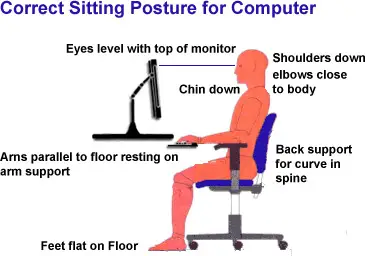
- Optimize Your Workstation: Ensure your desk, chair, and computer setup are ergonomic. Your wrists should be straight, elbows at a 90-degree angle, and your eye-level screen.
- Use Proper Equipment: Choose an ergonomic keyboard and mouse to reduce strain on your hands and wrists.
- Take Regular Breaks: Stretch and move around every 30 to 60 minutes to ease muscle tension.
- Maintain Good Posture: Keep your shoulders relaxed and avoid slouching. Poor posture can lead to additional strain.
Physical Techniques
- Stretch & Strengthen: Regular hand, wrist, and arm exercises can help maintain flexibility and strength.
- Adjust Your Grip: Avoid gripping objects too tightly, whether pens, tools, or phones.
- Use Proper Technique: Ensure you use the correct movements to prevent unnecessary strain.
Lifestyle Changes
- Stay Active: Regular physical activity keeps muscles strong and flexible.
- Manage Stress: Tension can contribute to muscle tightness—relaxation techniques like yoga or mindfulness can help.
- Listen to Your Body: If you start feeling discomfort, act early rather than wait for symptoms to worsen.
The Computer Mouse Trap Specific Exercises for RSI Prevention
Incorporating specific exercises into your routine can help prevent RSI. Here are some effective ones:
Stretching Exercises
- Full-Body Stretch: Extend your arms to the sides, rotate your palms upward, and bring your arms overhead. Interlock your fingers and press your palms toward the ceiling. Hold for 10-15 seconds.
- Neck Stretch: Sit upright, tuck your chin back, and slowly turn your head sideways. Hold for 10-15 seconds, then repeat on the other side.
- Shoulder Rolls: Shrug your shoulders, then roll them backward and forward a few times to release tension.
Hand & Wrist Exercises
- Prayer Stretch: Place your hands together in a prayer position and gently push to one side. Hold for 15-20 seconds, then switch sides.
- Forearm Stretch: Extend your arm with your palm facing up, then gently pull your fingers down using your other hand. Hold for 15 seconds, then reverse the stretch.
- Wrist Rotations: Make a gentle fist and slowly rotate your wrists in circles, inward and outward.
Posture & Strengthening
- Shoulder Blade Squeeze: Interlock your fingers behind your back, retract your shoulders, and stretch your arms downward. Hold for 10-15 seconds.
- Finger Flexion & Extension: Press your fingers toward your palm, then stretch them upward. Repeat on both hands.
Best Practices for Ergonomic Setup
Setting up an ergonomic workspace can help reduce strain on your body and prevent issues like RSI. Here are some best practices to keep in mind:
Desk & Chair Setup
- Chair Height & Support: Adjust your chair so your feet are flat on the floor and your knees are level with your hips. Use lumbar support to maintain the natural curve of your spine.
- Desk Position: Keep your desk at elbow height to prevent unnecessary strain on your wrists and forearms.
Computer & Screen Placement
- Monitor Position: Place your screen at eye level, about an arm’s length away. Use a stand or adjust the height to prevent neck strain if needed.
- Keyboard & Mouse Alignment: To minimize awkward wrist angles, keep your keyboard and mouse at a comfortable distance, ideally shoulder-width apart.
Posture & Movement
- Sit with Good Posture: Keep your shoulders relaxed and your back supported, and avoid slouching.
- Take Regular Breaks: Stand up, stretch, and change positions every 30 to 60 minutes to reduce tension.
- Use Proper Hand & Wrist Position: Keep your wrists straight when typing, and avoid resting them on hard surfaces for long periods.
Why is an Ergonomic Setup Important for Your Health?
An ergonomic setup is essential for maintaining long-term health and comfort, especially if you spend extended periods working at a desk or using electronic devices.
Here’s why it matters:
Benefits for Physical Health
- Prevents Musculoskeletal Issues: Poor posture and repetitive movements can lead to RSI, neck stiffness, back pain, and joint discomfort. A well-designed ergonomic workspace helps distribute strain evenly.
- Reduces Fatigue & Tension: Sitting in awkward positions forces muscles to work harder, leading to faster fatigue. Proper support keeps your body relaxed and reduces unnecessary stress.
- Enhances Circulation: Sitting for long hours without movement can slow blood flow. Ergonomic adjustments, including standing desks or frequent breaks, help improve circulation and reduce risks like deep vein thrombosis (DVT).
Boosts Productivity & Focus
- Minimizes Discomfort: Working in an uncomfortable position can be distracting. An ergonomic setup allows you to focus better and stay productive.
- Optimizes Efficiency: Properly placed tools (mouse, keyboard, monitor) reduce strain and make work smoother.
Reduces Eye Strain & Headaches
- Protects Vision: Screen glare and incorrect monitor placement can strain your eyes, leading to dryness, headaches, or blurred vision. Positioning your screen correctly and using blue light filters can help.
Mental & Emotional Well-being
- Encourages Movement: Ergonomic habits often include regular breaks, which help refresh the mind and improve overall well-being.
- Reduces Stress: Physical discomfort can lead to frustration and stress. A well-designed workspace makes work more enjoyable.
Conclusion
Understanding and addressing Repetitive Strain Injury (RSI) is crucial in our modern, tech-driven world. By recognizing the symptoms, causes, and prevention strategies associated with repetitive movements, you can protect yourself from the hidden risks.
Implementing ergonomic practices in your workspace and incorporating regular exercises can significantly reduce your risk of developing RSI. So, are you ready to break free from the computer mouse trap and prioritize your health? Let’s take action today! Feel free to reach out if you have any questions or need further guidance. Your health is worth it!
#RepetitiveStrainInjuryPrevention, #ErgonomicWorkspaceSetupTips, #SymptomsOfRepetitiveStrain, #SelfCareStrategiesForRSI, #ManagingPainAndDiscomfort, #ExercisesForWristHealth, #PostureCorrectionForOffice, #ReducingMuscleTensionEffectively, #WorkplaceAdjustmentsForComfort, #HealthyMovementHabitsDaily, #StressManagementTechniquesForRSI, #ImprovingProductivityAndFocus,




